Knowledge base chatbot: how it works and what it costs
A knowledge base chatbot answers customers from your own documents in seconds, in their own language, with the source shown. How it works and what it costs.
Most of the questions a business answers every week are already written down somewhere, on a help page, in a returns policy or in a price list. A knowledge base chatbot puts those answers in front of customers when they ask. For each question it looks up the parts of your documents that fit, writes an answer from them, and shows which document it used.
In October I set one up for ChatFrom itself, from our 16 help pages, and much of this guide comes from that. I also wanted to know what it really costs to run, so the numbers below are ones I measured, not list prices.
The short version on cost: on ChatFrom's default model, GPT-6 Luna, an answer costs about $0.00035 in model fees, which we count as one credit, a tenth of a cent. A thousand questions a month use about 1,000 credits, and the $29 Pro plan covers about 7,000 answers. Adding the documents costs almost nothing. A 40-page help centre comes to about one credit.
Below I go through how it works, what to put in it, how I would set one up, how to keep the answers right, and what a month costs on each model.
What a knowledge base chatbot is
A knowledge base chatbot answers only from the material you give it, such as your help centre, product pages, policies, price list, or the answers your team gives every day. It is often confused with two other kinds of chatbot. An FAQ bot can only repeat answers you wrote in advance. A general AI chatbot, like ChatGPT, answers from what it learned in training and does not know your business. The table shows how the three differ.
| FAQ bot | General AI chatbot | Knowledge base chatbot | |
|---|---|---|---|
| Where answers come from | Answers you wrote, matched to set questions | What the model learned in training | Your own sources, looked up for each question |
| Handles a question worded differently | Rarely | Yes | Yes |
| Knows your prices and policies | Only the ones you wrote in | No, or out of date | Yes, as your sources say them |
| Shows where an answer came from | No | No | Yes, the source under each answer |
| When it does not know | Falls back to a menu | Often guesses | Says so, and can hand over to a person |
| Up to date after a change | When you edit the answer | Not until the model is retrained | As soon as the page is added again |
For a business, the last two rows matter most. A wrong answer about a refund policy creates a support conversation instead of saving one. And a bot that has to be rebuilt every time a price changes usually ends up out of date, because nobody has the time to rebuild it.
How it answers a question
The technique has a name, retrieval-augmented generation, or RAG, which is why these are also called RAG chatbots. The idea is simpler than the name suggests.
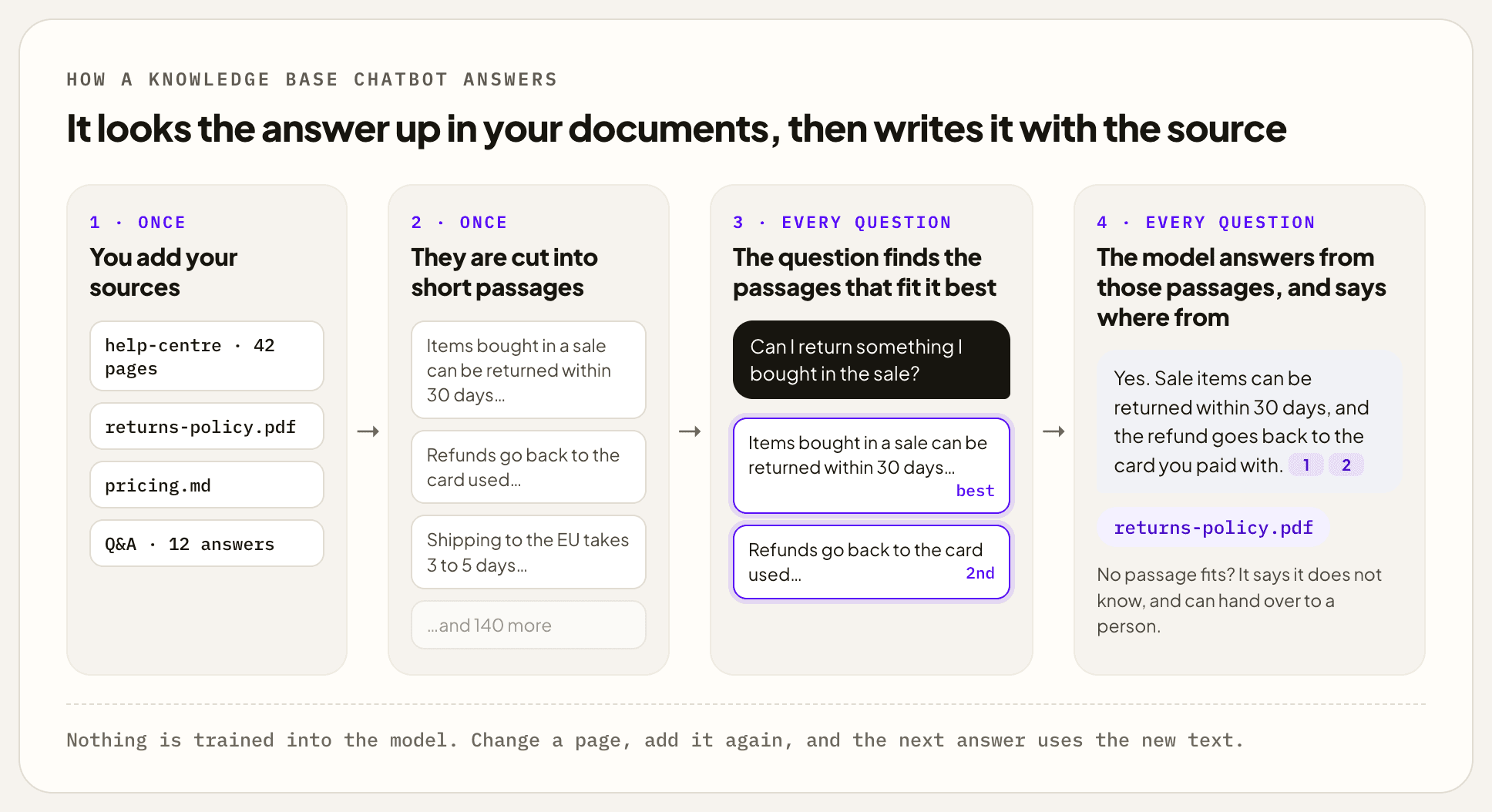
When you add a document, it is cut into short passages of a few sentences each. Each passage is stored with a description of its meaning, so it can be found by what it says rather than by its exact words. When a customer asks something, the question is compared with those passages and the few closest ones are picked. The model then writes the answer from those passages only, and names the one it used. If nothing fits well, a chatbot that is set up properly says it does not know instead of filling the gap.
Searching by meaning is what makes the rest work. A question about "sending something back" finds the passage about returns, even though the words are different. It also works across languages. I asked ChatFrom's own assistant, whose documents are all in English, one question in Japanese and one in Spanish. Both found the right help page, and both answers came back in the language of the question.
The size of the knowledge base matters less than people expect. Only a few passages are read for each answer, so the search stays quick even with thousands of documents, and an answer costs the same as it would in a small knowledge base.
Nothing is trained into the model at any point. That is the main practical difference from fine-tuning, and it is why a knowledge base chatbot can be set up in an afternoon and corrected in a minute.
What to put in it
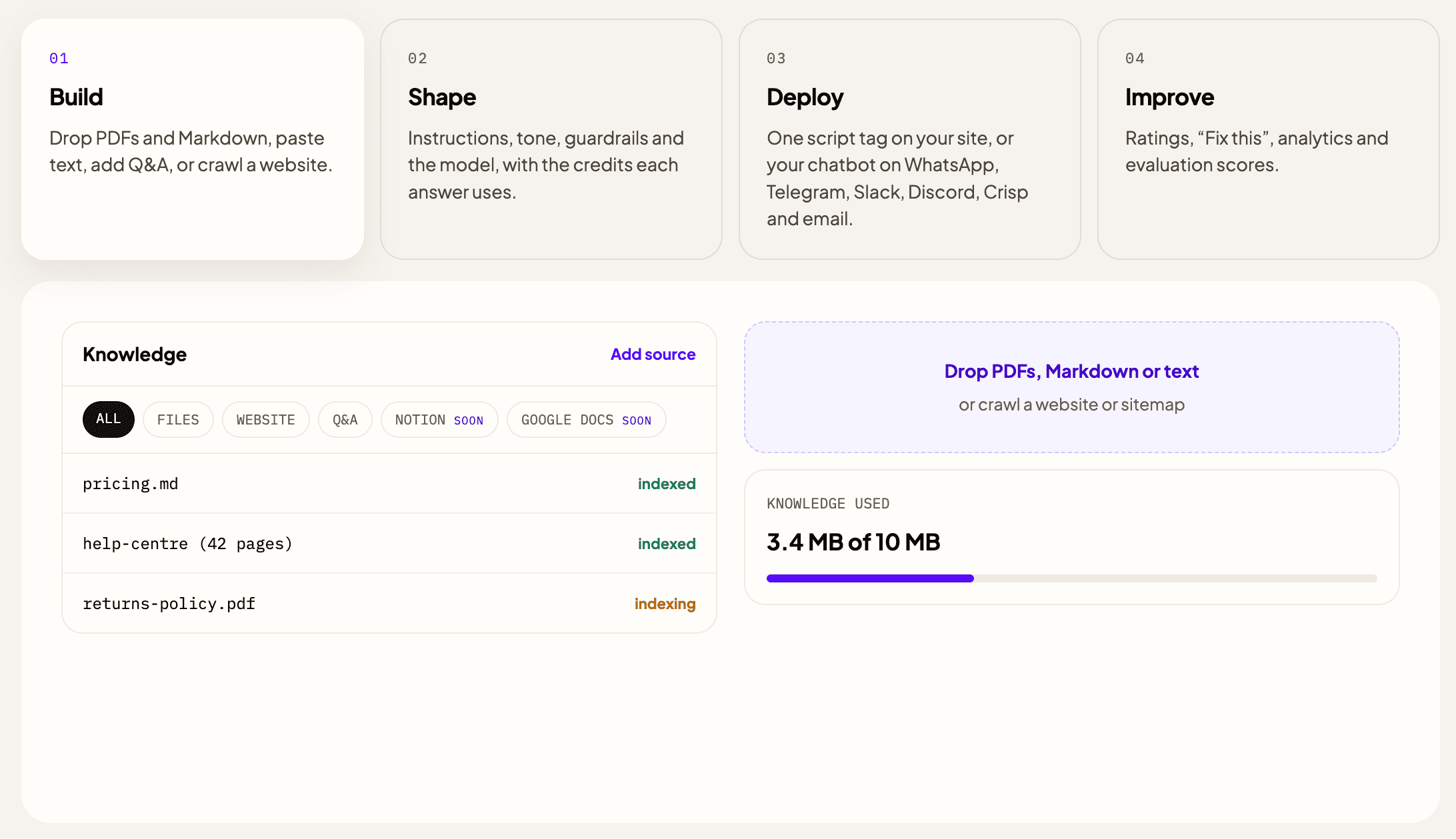
ChatFrom takes six kinds of source, and most chatbots end up using two or three of them.
- Files: PDF, plain text, Markdown or HTML, for policies, manuals and price lists.
- Your website: you enter the address, tick the pages you want, and they are read. You can keep it to one part of the site, such as everything under
/help. - Notion: you choose pages from your workspace, with nothing to export.
- Google Docs: you choose documents from your Google Drive, with nothing to download.
- Text: anything that is not written down elsewhere, like opening hours.
- Q&A: a question and the exact answer you want given.
If your help centre already lives in Notion, or your policies in Google Docs, I would start there. You pick the pages once, and there is no export to repeat every time something changes.
What you leave out matters as much as what you add. The first thing I would do is read a week of your inbox and note the 20 questions that come up most. The pages behind those questions are where most of the value is.
After that, a few habits save a lot of trouble later. Keep prices, opening hours and policies stated plainly, each in one place. A price mentioned in passing in an old blog post is a price the chatbot may quote, so remove what is out of date. For anything your pages explain badly, write a Q&A. It is quicker than rewriting the page, and a direct answer wins over a vague passage.
| ChatFrom plan | Knowledge | Largest file | Price |
|---|---|---|---|
| Free | 10 MB | 10 MB | $0 |
| Pro | 500 MB | 25 MB | $29 a month |
| Business | 1,000 MB | 50 MB | $49 a month |
For scale, a 40-page help centre is well under a megabyte of text. The limits only start to matter for large manuals or archives of scanned PDFs, which take more room than their words.
Setting one up in an afternoon
This is the order I follow with a new chatbot. The times are rough, for a business with a help centre and a few policies.
- Add your sources, about 15 minutes. Start with the help centre or FAQ page, the policies and the price list. You can add more once you see what people ask.
- Set how it talks and what it does when it does not know, about 10 minutes. That means the tone, the length of answers, and the fallback: a short line, and a hand-off to your team by email, Slack or Crisp.
- Test it with real questions, about 30 minutes. Ask the 20 questions from your inbox, worded the way customers word them, and read the source under each answer as well as the answer.
- Put it live. That is one script tag on your website, or WhatsApp, Telegram, Slack, Discord, Crisp or email. The same knowledge answers everywhere.
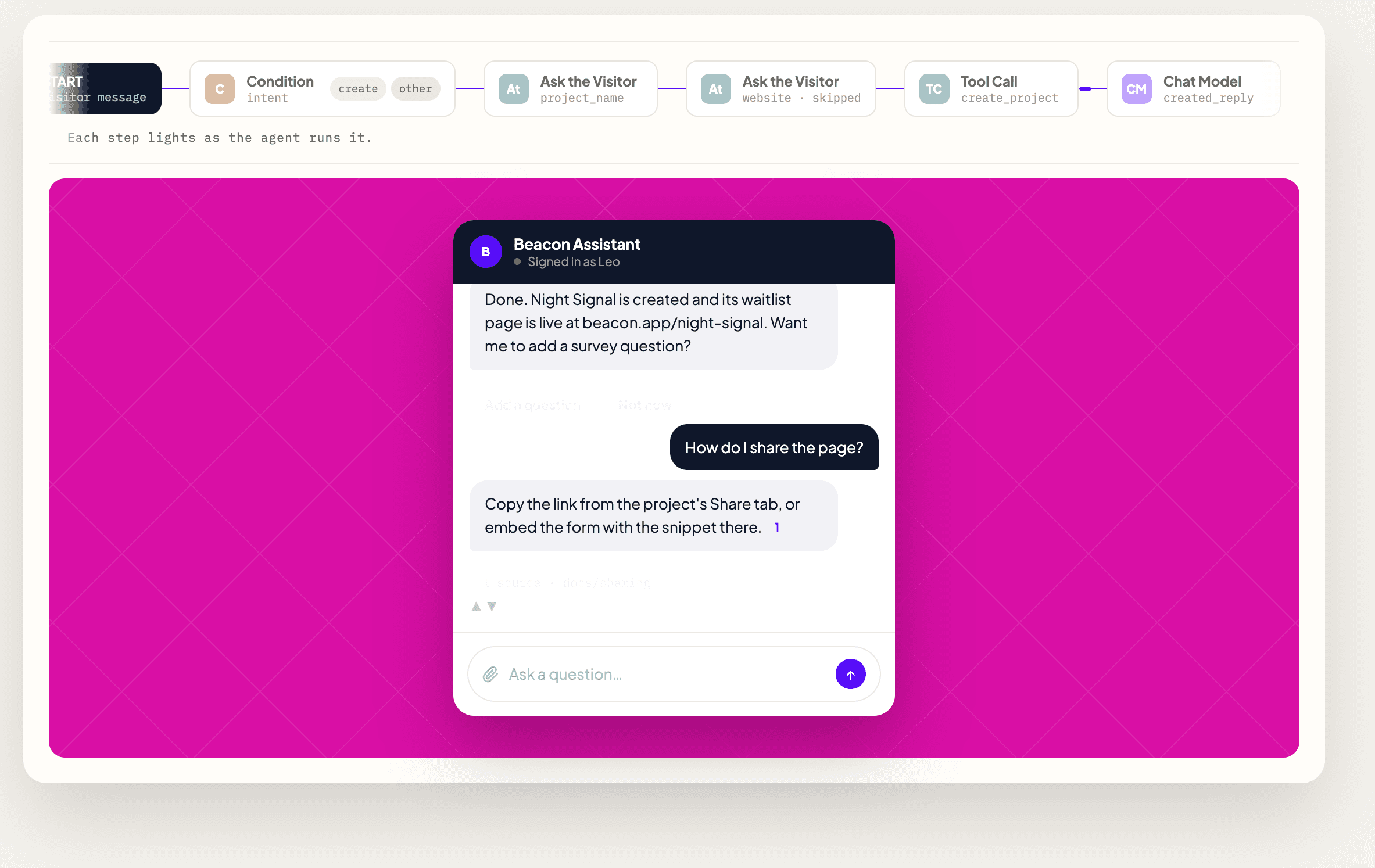
Most of the quality comes from the testing step. When an answer is wrong, the source under it usually tells you why. The page may be out of date, two pages may disagree, or the answer may not be written down anywhere. Each of those needs a different fix, and in my experience rewording the chatbot's instructions rarely helps with any of them.
Keeping its answers right
Once it is live, I would look at the weak answers every week or two. The conversation log shows each answer with its sources. If an answer came from an outdated page, fix the page and add it again. Pages that have not changed cost nothing to add again. If the answer is not in your documents at all, the Fix this button next to it lets you write the answer you wanted, and the chatbot uses it from then on.
Some problems only show up when you test. When I set up ChatFrom's assistant, the first configuration example it gave me came back with every line flush left. The cause was in how pages were cut into passages: the step that split a page at its headings also removed the spaces at the start of each line, including inside code. We fixed that in the engine, and code examples now keep their indentation. I would not have noticed without asking the kind of question a developer would ask.
For more than spot checks, an evaluation helps. You write a set of questions, each with a note on what a good answer does, and ChatFrom asks your chatbot all of them and scores the answers, so you can see whether a change helped. I ran 36 such questions on ChatFrom's assistant, including off-topic requests and attempts to make it reveal its instructions, and it scored between 9.6 and 9.9 out of 10. The points it lost were mostly for adding true details nobody had asked for. Evaluations are paid with your own OpenRouter key, not your plan's credits.
One more thing to watch for is text in a document that reads like an instruction, such as "ignore your previous instructions". It is an old trick. ChatFrom warns you when a source contains something like that, and treats every source as information, never as orders.
What it costs
Two things cost money: adding knowledge and answering questions. Adding knowledge costs $0.02 per million tokens of text, so a 40-page help centre, about 50,000 tokens, comes to roughly one credit. Answering is where the money goes, and how much depends on the model you choose. I measured each model on 16 October 2026 against what OpenRouter actually billed, using a first answer and a follow-up.
| Model | Credits per answer | Model fees for 1,000 answers | Answers a month on Pro ($29) |
|---|---|---|---|
| GPT-6 Luna (the default) | 1 (0.35, counted as 1) | $1.00 | 7,000 |
| Claude Haiku 5.5 | 1 (0.49, counted as 1) | $1.00 | 7,000 |
| Gemini 3.5 Flash-Lite | 1 (0.66, counted as 1) | $1.00 | 7,000 |
| Mistral Large 4 | 1.7 | $1.70 | 4,100 |
| GPT-6.1 Sol | 3.8 | $3.80 | 1,800 |
| Claude Sonnet 5.5 | 5.1 | $5.10 | 1,400 |
You never pay these fees one at a time. The plan has a fixed price, and the model decides how many answers fit into it. For most questions about your own documents a small model is enough, because the hard part, finding the right passage, happens before the model is asked. I would start on the default and only move up for questions that need more reasoning.
On the Free plan, the 50 credits a month cover about 50 answers on the default model. That is enough to test with your own questions, though conversations on Free are deleted two weeks after their last message. A business answering customers every day will need Pro or Business, and the plans are on the pricing page.
Build it yourself, or use a tool
You can build a knowledge base chatbot yourself. I did, so I can say where the time goes. The basic pieces are well known: splitting documents into passages, an embedding model, a vector database, the search, a prompt that keeps the model to the passages, citations and a chat widget. A developer can have a first version running in a few days.
What takes much longer is everything around it: rate limits, abuse protection, logs, questions in other languages, tuning how documents are split, and measuring answers so that a change does not quietly make them worse. The indentation problem above is a good example of the kind of thing you only find later. Building makes sense if you have engineers, unusual data, or rules that no product allows. For most businesses, a tool costs less than a developer's first week.
| Tool | Entry price a month | Answers it covers | Hosting in the EU |
|---|---|---|---|
| ChatFrom | $29 | About 7,000 on GPT-6 Luna | Frankfurt, on every plan |
| SiteGPT | $39 yearly, $59 monthly | 4,000 on GPT-4.1 mini | No |
| DocsBot AI | $41 yearly, $49 monthly | About 5,000 on GPT-6 Luna | On Enterprise |
| Chatbase | $32 yearly, $40 monthly | 700 on its cheapest models | On Enterprise |
| CustomGPT.ai | $89 yearly, $99 monthly | 1,000 queries | No |
These are the entry plans as each pricing page showed them on 13 October 2026. The entry price is not quite what a month costs, since every tool counts answers its own way. For 3,000 answers a month on a small model, ChatFrom comes to $29, SiteGPT to $39, DocsBot to $41 and Chatbase to $120. The compare page has the details.
When it is not the right fit
There are a few cases where I would not start with a knowledge base chatbot.
- The answers are not written down anywhere. When the knowledge is in people's heads, write the top 20 answers as Q&A first. The chatbot cannot answer what nobody wrote.
- Most questions need someone's judgement, such as complaints, negotiations, or medical and legal questions. A chatbot can collect the details and hand over, but it should not decide.
- Your customers mostly phone. A knowledge base chatbot answers in writing, on your site and in chat apps, and ChatFrom has no phone channel.
- You need a help desk, with tickets, a shared inbox and team workflows. That is a different product. A chatbot can sit in front of one, or work on its own when you have no support team.
Common questions
Does a knowledge base chatbot make things up?
Much less than a general chatbot, because it answers from passages it looked up and can say when none fits. It is not perfect, though. If two of your pages disagree, it may quote the wrong one, which is why the source under each answer matters and why testing with real questions is part of the setup.
Do I need to train it?
No. Nothing is trained. You add sources, and each question looks them up. When a page changes, you add it again and the next answer uses the new text.
Can it answer in other languages?
Yes. The search works by meaning rather than by matching words, so a question in Spanish or Japanese finds the passage in your English help centre. By default, ChatFrom answers in the language each visitor writes in, even when your documents are in another one. You can also set it to always answer in one language, chosen from 14.
What kinds of documents can I add?
PDF, Markdown, plain text and HTML files; pages from your website; pages from Notion; documents from Google Docs; and text or questions with their answers typed in. A Word file or a slide deck can be saved as a PDF first.
How many documents can it hold?
Thousands. ChatFrom's Pro plan holds 500 MB of knowledge and Business 1,000 MB, and a 40-page help centre is well under one megabyte of text. Each question reads only the few passages that fit it, so a larger knowledge base barely changes how quickly an answer is found, and does not make it dearer.
What does a knowledge base chatbot cost a month?
On ChatFrom, the plan price: $29 for Pro, which covers about 7,000 answers on the default model, or $49 for Business, about 20,000. There is no fee per conversation, and nothing is charged past the plan.
Can it hand over to a person?
Yes. When it does not know, or when the visitor asks for a person, it can pass the conversation to your team by email, Slack or your Crisp chatbox, with the conversation so far.
Is it right for you?
| If | A knowledge base chatbot | Why |
|---|---|---|
| Most questions are answered somewhere in your docs | Fits well | It finds the passage and answers in seconds, day and night. |
| Your docs change often | Fits well | Nothing is trained: add the page again and the next answer uses it. |
| You want to know where each answer came from | Fits well | The source is shown under every answer. |
| Most questions need a person to decide | Partly | It can collect the details and hand over, but should not decide. |
| Your customers mostly phone | No | It answers in writing, not on the phone. |
If your answers are already written down somewhere, a knowledge base chatbot is an inexpensive way to make them available at any hour. A thousand answers on the default model use about a dollar of a $29 plan. I would start with the pages behind your top 20 questions, test with real questions, and add more as you see what people ask.
ChatFrom builds a knowledge base chatbot from your documents and website, for customer support on your site, in chat apps and on email. You can start on the Free plan, with no card, and test it with your own questions before you choose a plan.