WhatsApp AI chatbot for business: setup and real costs
How to put an AI chatbot on your business's WhatsApp number, what Meta charges for each reply, and what a month costs in different countries.
A WhatsApp AI chatbot answers the messages people send to your business's WhatsApp number, from your own documents, at any hour. Running one means paying twice. The chatbot has its own price, and Meta charges for the replies it sends once you are past a free allowance.
Meta's part is the one that surprises people, because it depends on where your customers are. Messages from customers cost nothing, and so do the first 1,000 replies a month on each number. After that, a reply costs $0.0034 to a number in the US or Canada, $0.022 in the UK and $0.055 in Germany. For a shop with about 1,000 conversations a month, the whole bill with ChatFrom Pro comes to $35.80 in the US and to $139 in Germany, where $110 of it goes to Meta.
ChatFrom is what I make, so I will also say where another tool fits better. Below I go through what such a chatbot is, what Meta charges, what a month really costs, the main tools, how to set one up and what ChatFrom does not do on WhatsApp.
What a WhatsApp AI chatbot is
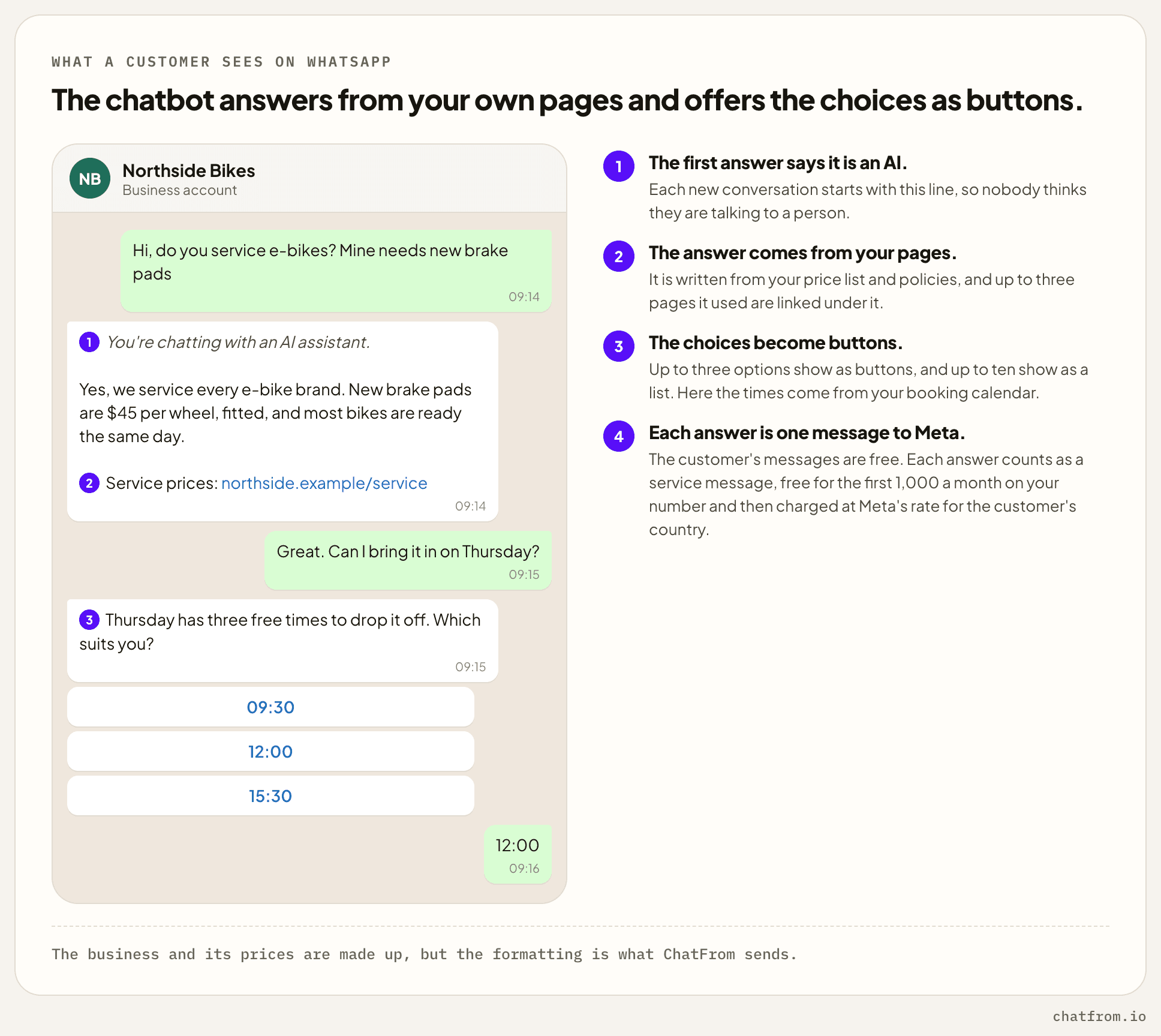
It is a chatbot on your business's own WhatsApp number. A customer writes as they would to a person, and the chatbot answers from your help pages, price list and policies. With tools, it can also look up an order, offer times from your calendar or take a request for a call back. When it cannot help, it passes the conversation to your team.
There are three ways to automate WhatsApp, and only one of them lets you choose the chatbot.
| WhatsApp Business app | Meta Business Agent | A chatbot on the Cloud API | |
|---|---|---|---|
| What it is | Meta's free app, on one phone | Meta's own AI agent, inside the app, in some markets | A chatbot tool, connected through Meta's API |
| What it answers | Set texts, such as a greeting, an away message and quick replies | Questions, from your website, catalog, Facebook Page and uploaded documents | Questions, from your documents, with tools such as bookings and orders |
| What it costs | Nothing | No price shown for the app, and $2 per million tokens through the API | The tool's plan, plus Meta's fee for each reply past 1,000 a month |
| Who replies when it cannot | You, in the app | You, in the app | Your team, wherever the tool hands over to |
The free app cannot run a chatbot of your own, because its automatic replies are fixed texts. Meta's own agent is the easy option if you run your business from the app and Meta offers it where you are. Every other WhatsApp chatbot, ChatFrom included, connects through Meta's Cloud API, which means moving your number onto it.
What Meta charges
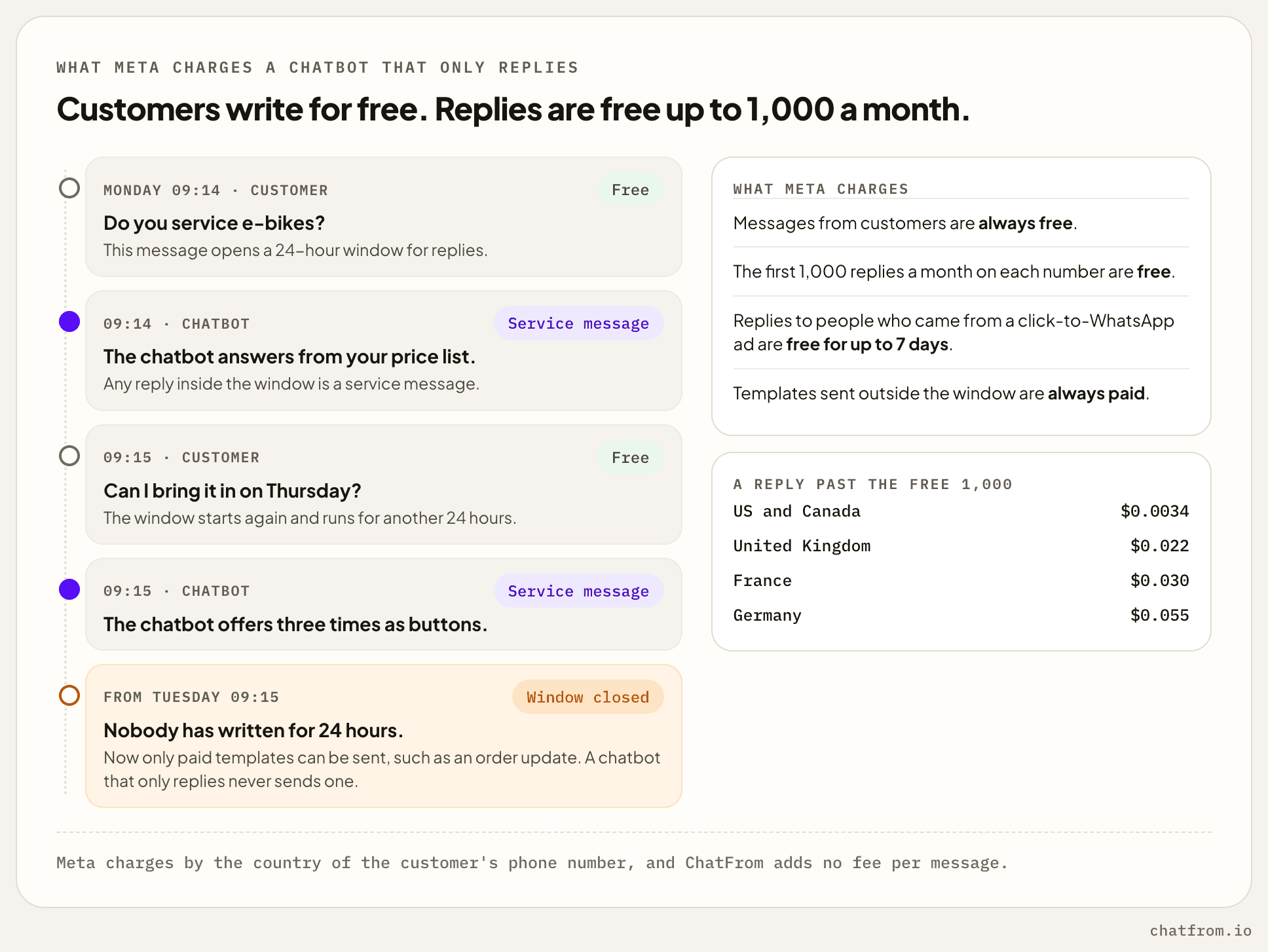
Meta charges per message, by the kind of message and by the country of the customer's phone number. Messages from customers are always free. What a chatbot sends falls into two kinds.
Each message a customer sends opens a 24-hour window, and anything you send inside it counts as a service message. The first 1,000 service messages a month on each business number are free. After that, each one costs what Meta charges for a utility message in that country.
Outside the window, a business can only send a template that Meta has approved, and templates are always paid. You need one to write to someone first, or to write again after a day of silence. A chatbot that only replies never sends one.
You may read elsewhere that replies inside the window are free. Meta's own business site still says so, but its developer pricing page, which is what Meta bills by, charges them past the first 1,000.
Two more things are worth knowing. When someone writes after tapping one of your click-to-WhatsApp ads and you answer within 24 hours, your replies are free for up to seven days. And without a payment method on your WhatsApp account, Meta stops delivering replies once the month's free ones are used.
| Country | A reply past the free 1,000 | 1,000 such replies | A marketing template |
|---|---|---|---|
| India | $0.0014 | $1.40 | $0.0118 |
| US and Canada | $0.0034 | $3.40 | $0.025, and not delivered to US numbers |
| Brazil | $0.0068 | $6.80 | $0.0625 |
| Rest of Western Europe | $0.0171 | $17.10 | $0.0592 |
| Spain | $0.020 | $20 | $0.0707 |
| United Kingdom | $0.022 | $22 | $0.0635 |
| France | $0.030 | $30 | $0.0859 |
| Italy | $0.030 | $30 | $0.0795 |
| Netherlands | $0.050 | $50 | $0.1597 |
| Germany | $0.055 | $55 | $0.1365 |
These are Meta's rates in US dollars, from the rate card on its pricing page. Rest of Western Europe means Austria, Belgium, Denmark, Finland, Ireland, Norway, Portugal, Sweden and Switzerland. A reply to a German number costs 16 times as much as one to an American number. That is a bigger difference than you will find between any of the tools below.
What a month costs
To work out a monthly bill, I'll assume each conversation takes three answers, as I did in my Fin comparison. Each answer goes out as one WhatsApp message unless it runs past 4,000 characters, which few do. So 1,000 conversations mean 3,000 replies, and 2,000 of them are past Meta's free 1,000. On ChatFrom's default model each answer uses one credit, so the 7,000 credits on Pro cover about 2,300 conversations.
| Conversations a month | Replies past the free 1,000 | US and Canada | Germany |
|---|---|---|---|
| 300 | None | $29, just the Pro plan | $29, just the Pro plan |
| 1,000 | 2,000 | $35.80, with $6.80 to Meta | $139, with $110 to Meta |
| 2,300 | 5,900 | $49.06, with $20.06 to Meta | $353.50, with $324.50 to Meta |
| 3,000 | 8,000 | $76.20 on Business, with $27.20 to Meta | $489 on Business, with $440 to Meta |
If you have fewer than about 330 conversations a month, Meta charges nothing at all, because every reply fits in the free 1,000. The only bill is the chatbot's plan.
In the US and Canada, the plan is still most of the bill. A thousand conversations add only $6.80 from Meta. In Germany and the Netherlands it is the other way round, because each reply past the free 1,000 costs 5 to 5.5 cents there. That is more than twelve times what the answer itself costs on Pro.
The plan has a limit too. Pro covers about 2,300 conversations a month, and after that the chatbot stops answering until the next month starts. If you need more, Business at $49 covers about 6,600.
Meta bills its part to the payment method on your WhatsApp account, and ChatFrom adds nothing per message. Some tools resell Meta's messages at a markup, so that is worth checking on any price list. ChatFrom's own plans are on the pricing page.
WhatsApp chatbot tools compared
These are the tools businesses most often look at for WhatsApp, with the prices from their own websites. Some are chatbots, some are shared inboxes for a team, and two are only the connection to WhatsApp.
| Tool | Price a month | Meta's fees | AI answers |
|---|---|---|---|
| ChatFrom | Hobby free, Pro $29, Business $49 | Paid by you to Meta, at Meta's rates | Included, from your documents, on six models |
| respond.io | Starter $99, Growth $199, Advanced $349 | At Meta's rates, with no markup | Included from Growth |
| WATI | Growth €69, Pro €149, Business €349, as shown in Germany | Billed by WATI, at its own rates above Meta's | Its Astra AI agents, one on Growth, two on Pro and any number on Business |
| ManyChat | From $17 to from $199, rising with your contacts | Not stated on its pricing page | AI features from Pro |
| Twilio | No plan, $0.005 per message in either direction | Meta's fee on top | None built in |
| 360dialog | €49 per number, or €99 on Premium | Meta's fee on top | None built in |
| Meta Business Agent | No price shown for the app, and $2 per million tokens on the API | Included in its price | Meta's own, in some markets |
For four of them, here is what a business with 1,000 conversations a month would pay.
| 1,000 conversations a month | US and Canada | Germany |
|---|---|---|
| ChatFrom Pro at $29 | $35.80 | $139 |
| respond.io Growth at $199, with AI | $205.80 | $309 |
| Twilio, plus an AI of your own | $36.80, plus the AI | $140, plus the AI |
| Meta Business Agent, by Meta's estimate | About $120 to $150 | About $120 to $150 |
respond.io includes AI on Growth up to a set number of credits and charges $15 for each 1,000 credits after that, so its total assumes you stay within them. Twilio charges for messages in both directions. Your customers' 3,000 messages and your 3,000 replies make 6,000 messages, which is $30 before Meta's fee and before any AI.
Meta Business Agent is charged by tokens from the very first message, with nothing free. Meta estimates 4 to 5 cents a message with delivery included, or 16 to 20 cents for a simple question that takes four messages. In Germany that is less than Meta charges for a reply from any other tool once the free 1,000 are used. In the US it is more than ten times as much.
WATI showed me its prices in euros, and it charges more than Meta for each message. A reply to Germany costs $0.066 there, against Meta's $0.055, and one to the US costs $0.0041 against $0.0034.
So which one fits depends less on the price than on what your team does on WhatsApp.
- ChatFrom is a good fit if you want answers from your own documents at a flat price and your team follows up by email, Slack or your help desk. The same chatbot also answers on your website and in other chat apps.
- respond.io is better when several people on your team chat with customers on WhatsApp themselves and want a shared inbox, with the AI included.
- WATI makes sense if you also send broadcasts and order updates. Its plans now include its own AI agents, but its message rates are above Meta's.
- ManyChat is worth a look if WhatsApp is one part of marketing that also runs on Instagram and Messenger.
- Twilio and 360dialog are for a developer who wants to build the chatbot. They only connect you to WhatsApp.
- Meta Business Agent is the simplest option if you already run your business from the WhatsApp Business app and Meta offers it where you are. I have not tested it.
To see ChatFrom against help desks and other chatbot builders, there is the compare page.
Setting one up
With ChatFrom, the WhatsApp part takes about half an hour, most of it in Meta's developer tools. Build and test the chatbot first, because on WhatsApp it answers with the same knowledge, tools and workflows as on your website.
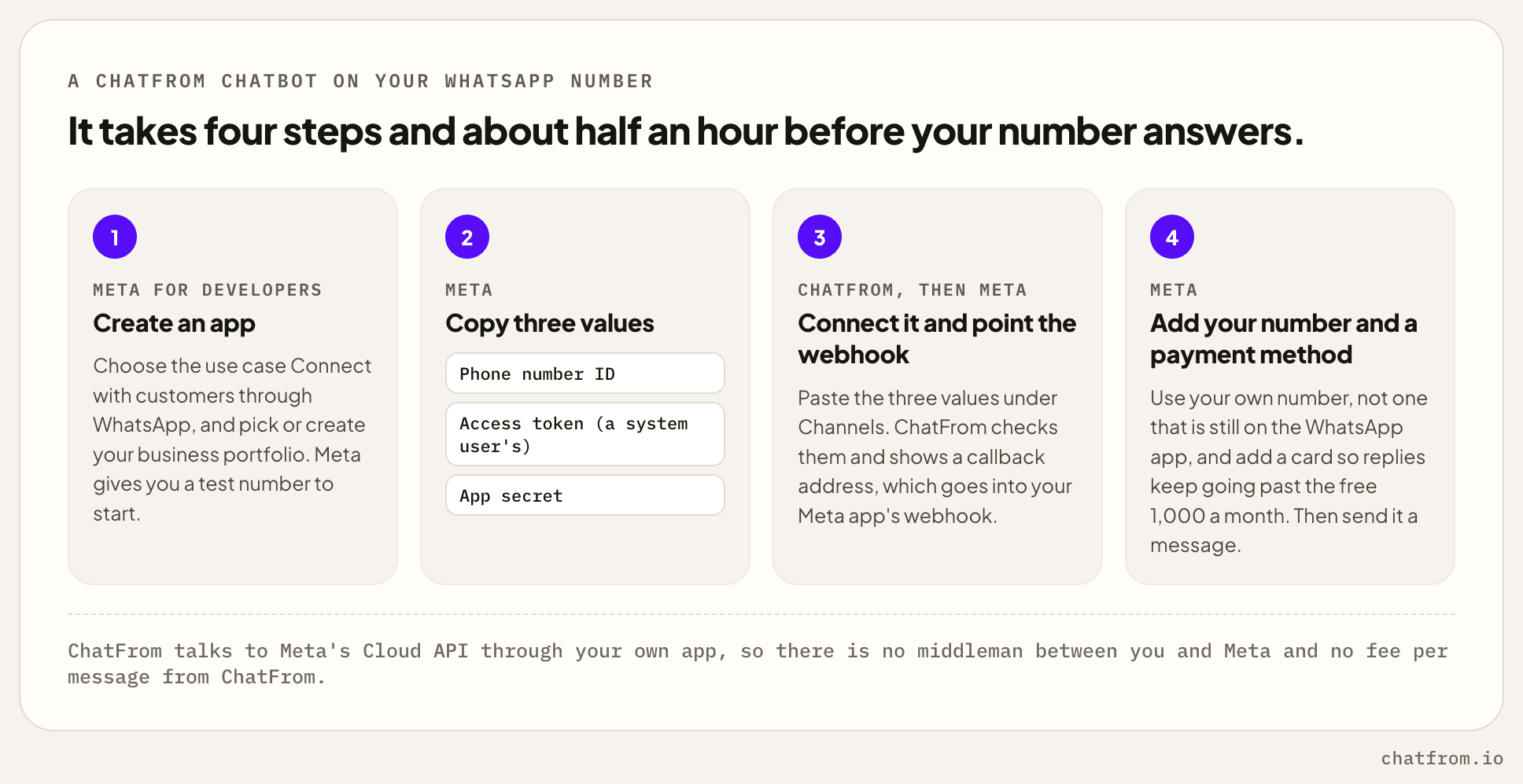
- Create a Meta app with the use case Connect with customers through WhatsApp, in your business portfolio. Meta gives you a test number to start with.
- Copy three values from Meta. You need the Phone number ID, an access token from a system user, which does not expire, and the App secret.
- Paste them under Channels in ChatFrom. It checks them with Meta and shows a callback URL and a verify token. Enter both in your Meta app's webhook, and subscribe to messages.
- Add your own number and a payment method, then send your number a message to try it.
Every screen and field is in the WhatsApp guide. Two of Meta's rules catch people out. The number must be yours, able to get a code by SMS or call, and not still in use on WhatsApp. Meta asks you to delete it from the app first, so save anything you want to keep. Meta's daily limits for new businesses only count conversations the business starts, so they don't slow down a chatbot that only replies.
Meta's rules for AI chatbots
Automated replies are allowed. WhatsApp's business policy says that "You may use automation when responding during the 24-hour window", and it asks for a prompt, clear way to reach a person. In ChatFrom that is the hand-off, which passes the conversation to your team.
General-purpose AI assistants are not allowed. Meta's terms bar AI providers whose product on WhatsApp is a general assistant, like a ChatGPT for anyone, except where the law requires Meta to allow them. A chatbot that answers questions about your own business is ordinary customer service.
Meta also requires a person's agreement before a business writes to them first. A chatbot that only answers people who wrote to you never needs it.
Meta does not ask a chatbot to say it is an AI, but I think it should. ChatFrom starts each new conversation with "You're chatting with an AI assistant."
What ChatFrom does not do on WhatsApp
These limits are real, and for some businesses they decide the choice.
ChatFrom has no WhatsApp inbox for your team. A hand-off reaches your team by email, Slack or your help desk, with the conversation so far, but nobody can reply in WhatsApp from ChatFrom. If your team wants to chat with customers on WhatsApp itself, respond.io or WATI fit better.
It never writes first, so there are no broadcasts, reminders or order updates. Those need Meta's templates, which ChatFrom does not send.
Your number leaves the WhatsApp Business app. ChatFrom connects through your own Meta app, so the number then works on the Cloud API alone. Meta's way to keep a number in both, called Coexistence, goes through a Meta partner's sign-up flow.
It reads text, photos and files, and nothing else. With files allowed it reads photos, PDFs and text files, and it asks for text when someone sends a voice note or a video.
Setup happens in Meta's developer tools. It takes about half an hour, with a system user token and a webhook. That is not hard, but it is not one click either.
Common questions
How much does a WhatsApp AI chatbot cost?
There are two bills, the chatbot's plan and Meta's fee for each reply past the first 1,000 a month on your number. With ChatFrom Pro at $29 and three answers a conversation, 1,000 conversations a month cost $35.80 in the US and $139 in Germany. Below about 330 conversations a month, Meta charges nothing.
Does WhatsApp charge for chatbot replies?
Yes, it does once you are past the first 1,000 a month on each business number. A reply costs what a utility message costs in the customer's country, which is $0.0034 in the US and Canada, $0.022 in the UK and $0.055 in Germany. Messages from customers are free.
Is an AI chatbot allowed on WhatsApp?
Yes, it is allowed for a business that answers its own customers. WhatsApp's policy allows automated replies within the 24-hour window, as long as people have a clear way to reach a person. What Meta bars are general-purpose AI assistants offered to anyone.
Can I keep using the WhatsApp Business app on the same number?
You can't with ChatFrom, because the number has to be on the Cloud API alone. Meta's Coexistence keeps a number in both, but it is set up through a Meta partner's sign-up flow. Meta Business Agent runs inside the app itself, in the markets where Meta offers it.
Do I need message templates?
You don't need them for a chatbot that only replies. Templates are for writing first, or for writing after 24 hours without a message from the customer. ChatFrom answers each message as it arrives, so it never needs one.
Can it answer voice notes?
No, it can't. ChatFrom reads text, photos, PDFs and text files, and asks for text when someone sends a voice note or a video. It answers in the language the customer writes in, or always in one language you pick from 14.
Verdict
| If you want | Choose | Why |
|---|---|---|
| Answers from your own documents at a flat price | ChatFrom | Pro is $29 for about 7,000 answers, and Meta's fees go to Meta at its own rates. |
| Your team chatting with customers in a shared inbox | respond.io or WATI | ChatFrom has no WhatsApp inbox, and its hand-offs go by email, Slack or your help desk. |
| Broadcasts, reminders and order updates | WATI or respond.io | They need templates, which ChatFrom does not send. |
| To keep your number in the WhatsApp Business app | Meta Business Agent | It runs inside the app, in the markets where Meta offers it. |
| To build the chatbot yourself | Twilio or 360dialog | They connect WhatsApp, and the AI is yours to build. |
If your customers are in the US, Canada or India, Meta's fees are small and the tool's price decides the bill. There, I think a flat-price chatbot like ChatFrom is the cheapest way to answer on WhatsApp. A thousand conversations cost $35.80 a month, all in. In Germany or the Netherlands it is the other way round. Past the free 1,000 replies, Meta's fee is most of the bill whichever tool you choose.
Either way, count your replies before you choose. Three answers a conversation is my assumption, and your own conversation log will tell you the real number. That number, times your customers' country rate, is most of what WhatsApp will cost you.
ChatFrom builds a chatbot from your documents and website, and puts it on your WhatsApp number, your site and other chat apps. You can start on the free Hobby plan, with no card, and try it on Meta's test number before you connect your own.