Ecommerce chatbot for Shopify: orders, returns and cost
An ecommerce chatbot answers your shop's customers at any hour, from where their order is to how to send it back. How it works with Shopify, and what it costs.
If you run an online shop, you answer the same few questions every day. Where is my order? Can I send this back? How long does delivery take? An ecommerce chatbot answers them for you in the chat on your website, at any hour, including evenings and weekends when nobody is at the desk.
Questions about delivery and returns it answers from your own pages. The more useful part is orders. Connected to your Shopify store, it can find a customer's order, tell them where it is with the tracking link, and start a return when they want to send something back.
I built this into ChatFrom because order questions are the ones most chatbots cannot help with. Below I explain how it works, how to set it up, and what it costs. On cost, the short version is that each reply the chatbot writes uses one credit, so a question about an order uses one or two. The $29 Pro plan comes with 7,000 credits, which covers several thousand order questions a month.
What an ecommerce chatbot does
Most of what a shop is asked falls into three groups, and each one needs something different from a chatbot.
| Kind of question | For example | What the chatbot needs |
|---|---|---|
| About the shop | How long does delivery to Canada take? Can I return a sale item? | Your delivery, returns and FAQ pages |
| About a product | Is this mug dishwasher safe? What size should I order? | Your product pages |
| About an order | Where is my order #1042? I want to send the lamp back. | Access to your Shopify orders |
The first two are answered from pages you already have, the way a knowledge base chatbot works. The third is different. The answer is not written on any page. It is in Shopify, it changes every day, and it is private. A chatbot that cannot see your orders can only tell the customer to check their email or wait for a reply, so the question still lands on your desk.
How it answers "Where is my order?"
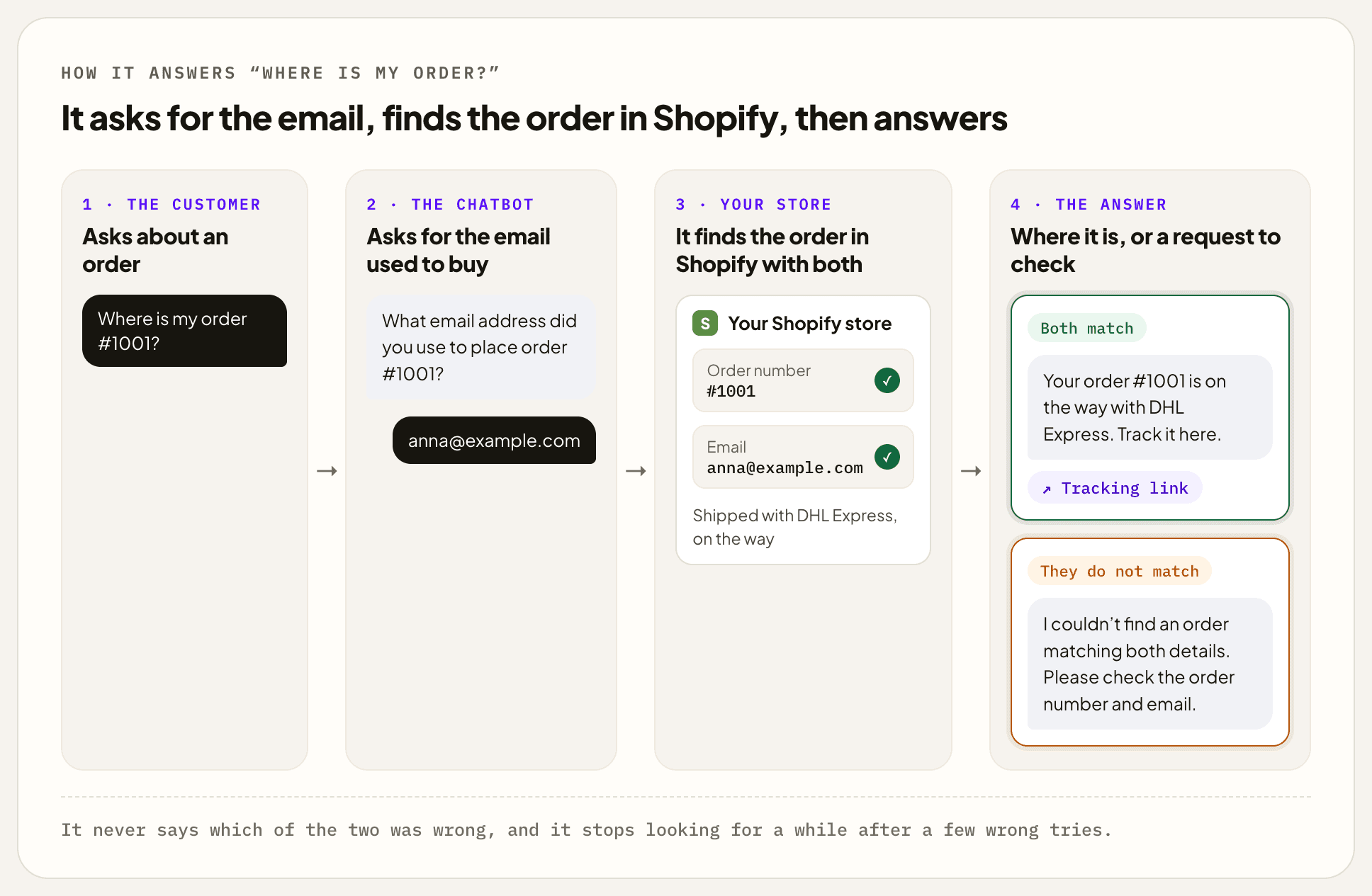
When a customer asks about an order, the chatbot asks for the order number and the email address they used to buy. It finds the order in your store and tells them where it is, whether it has shipped, which carrier has it, when it should arrive if Shopify knows, and the tracking link.
A typical conversation goes like this.
CustomerWhere is my order #1001?
ChatbotWhat email address did you use to place order #1001?
Customeranna@example.com
ChatbotYour order #1001 is on the way with DHL Express. Track it here. (tracking link)
Asking for the email is what keeps orders private. Order numbers are easy to guess, because Shopify counts them up from #1001, but a stranger does not know the email that goes with one. If the two do not match, the chatbot asks the customer to check them, without saying which one was wrong, and after a few wrong tries it stops looking for a while. In a group chat, where other people can read along, it leaves the tracking link out, since a tracking page can show someone's address.
It answers in the customer's own language, so someone who writes in German gets the answer in German, even if your shop is in English. And it does not promise what it cannot do. Ask it to keep an eye on a parcel and it gives you the tracking link, rather than saying it will message you later.
How returns work
The chatbot can start a return, but it never refunds anyone. When a customer wants to send something back, it checks which items in their order can be returned, asks why if they have not said, and asks them to confirm. Then it sends a return request to your store. You approve or decline it in Shopify, the way you handle any return, and Shopify emails the customer.
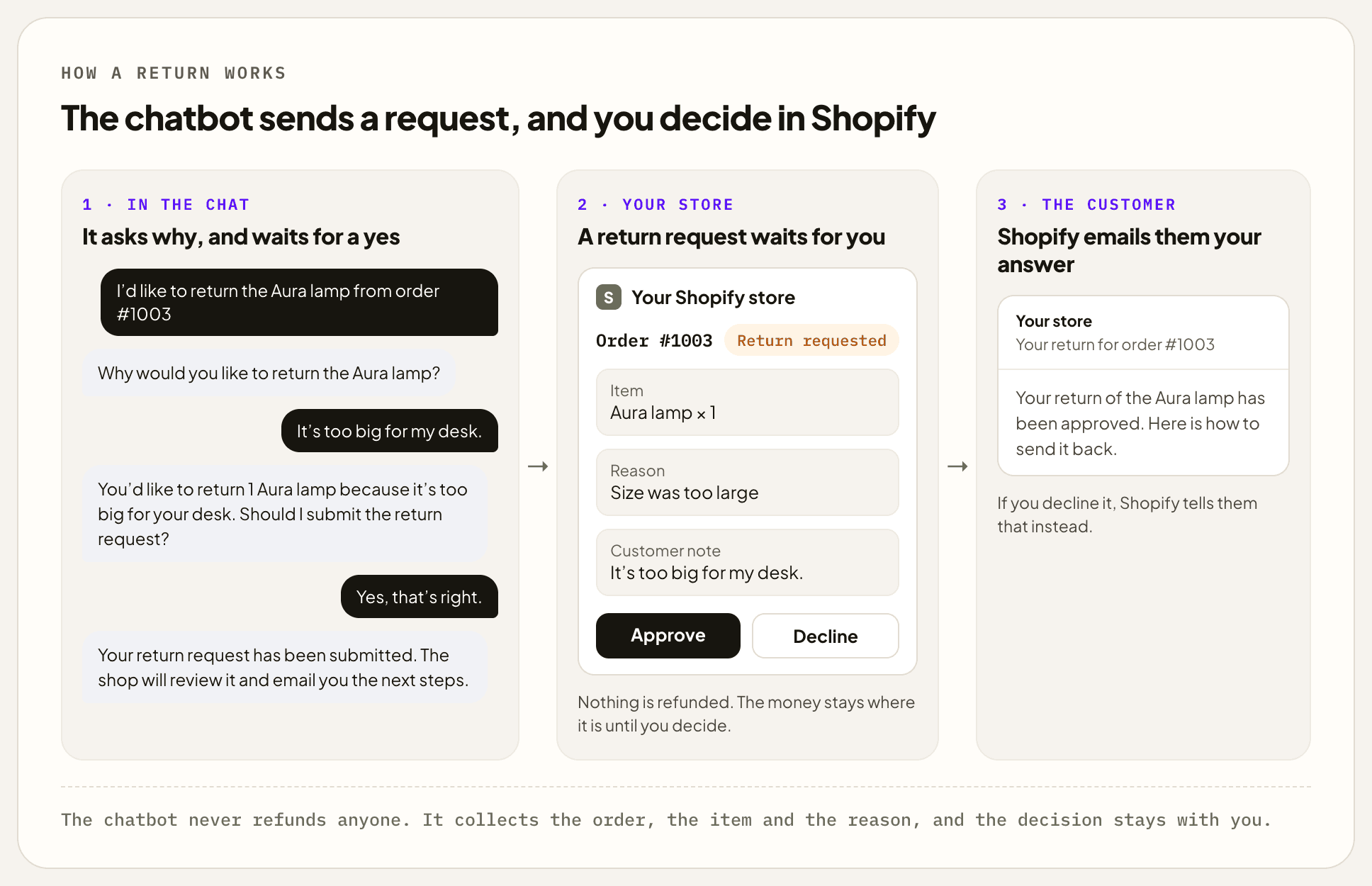
It is careful with the details, because a wrong return is worse than none. If an order has three similar items, it asks which one. If someone wants to return three of something they bought once, it tells them only one can go back. And if the order has not shipped yet, it says so and offers to pass them to your team.
I left refunds out on purpose. The chatbot does the back-and-forth of finding the order, the item and the reason, and the decision about money stays with you.
What to give it to read
Order details come straight from Shopify. Everything else comes from pages you give the chatbot, and a shop usually needs only a few.
- Your delivery page, with times, prices and the countries you ship to.
- Your returns policy, with how long customers have, what cannot be returned, and who pays for the label.
- Your product pages, for sizes, materials and care.
- A few questions and answers for anything that is not written down anywhere, such as "Do you ship to PO boxes?"
Adding them is quick. You type in your shop's address, tick the pages you want, and the chatbot reads them. Shopify keeps your delivery and refund policies on pages of their own, so they are easy to find in the list.
One thing it does not see is your live stock. If a product page says something is in stock, that is what the chatbot knows until you add the page again. If customers ask about stock a lot, leave that to the product page itself, which always shows the current state.
Setting it up
For a typical shop this takes under an hour.
- Connect your store, about 10 minutes. There is no ChatFrom app in the Shopify App Store yet, so you create a small private app for your own store in Shopify and copy its two keys into ChatFrom. The Shopify guide shows every click, and ChatFrom tells you if anything is missing.
- Add your pages, about 15 minutes. Start with delivery and returns, then the products people ask about most.
- Try it with real orders, about 15 minutes. Ask about one order that was delivered, one on its way, one not shipped yet, and one with the wrong email, and read each answer as your customer would.
- Put it on your shop, about 5 minutes. ChatFrom gives you one line of code to paste into your Shopify theme. If someone else looks after your shop, send it to them. It takes a minute.
Inside ChatFrom, all of this is one ready-made path in the workflow editor, called Orders. Once your Shopify store is connected, you add it from the list of ready-made paths. It puts one question in front of every message. Questions about an order go to a step that works with your Shopify store, and everything else is answered from your pages, as before.
It sorts by what the customer means, not by keywords, and it follows the conversation. Here are a few messages and where each one goes.
| The customer writes | Goes to | What happens |
|---|---|---|
| Where is my order #1001? | order | It asks for the email and finds the order. |
| anna@example.com, after being asked for it | order | It carries on with the order it asked about. |
| The lamp is too big, can I send it back? | order | It checks the order and starts a return. |
| Yes, go ahead, after being asked to confirm | order | It sends the return request. |
| How long does delivery to Canada take? | other | It answers from your delivery page. |
| Is this mug dishwasher safe? | other | It answers from the product page. |
The same chatbot can also answer on WhatsApp, Telegram, Slack, Discord, Crisp and email, with the same pages and the same order lookups.
What it costs
ChatFrom has a fixed monthly price, $29 for Pro and $49 for Business, with every feature on both. Each plan comes with credits for the month, and on the default model each reply the chatbot writes uses one. A question about delivery or returns takes one reply. A question about an order takes one or two, depending on whether the customer gives the order number and email straight away, and a return takes two or three, because the customer confirms it first.
| Conversation | Credits | How many fit in Pro's 7,000 |
|---|---|---|
| A question about delivery or returns | 1 | 7,000 |
| Where is my order? | 1 or 2 | 3,500 to 7,000 |
| A return | 2 or 3 | 2,300 to 3,500 |
In a real month these mix. Take a shop that gets 500 order questions, 100 returns and 1,000 other questions. That comes to 2,300 credits at most, about a third of what Pro includes. There is no charge per conversation and no bill on top of the plan.
On the free Hobby plan, 50 credits a month are enough to try it on a few real orders before you decide. Conversations on Hobby are deleted two weeks after their last message.
How it compares with Shopify Inbox, Gorgias and Tidio
These three come up most when a Shopify shop looks at chat. They are different kinds of product, so the table shows what each one is as well as what it costs. Prices are from each company's own pricing page.
| ChatFrom | Shopify Inbox | Gorgias | Tidio | |
|---|---|---|---|---|
| What it is | A chatbot that answers from your pages and looks up orders | Shopify's free chat app, with an AI sales assistant | A help desk for online shops, with AI | Live chat, with an AI assistant called Lyro |
| Price to start | $29 a month, everything included | Free | From $10 a month for 50 tickets | From $24.17 a month for 100 conversations |
| How the AI is paid for | Included in the plan | Included | $0.90 to $1.00 for each conversation the AI handles | Add-on from $32.50 a month for 50 AI conversations |
| A shared inbox for your team | No, it hands over by email, Slack or Crisp | Yes | Yes | Yes |
The biggest difference is how the AI is paid for. Gorgias charges about a dollar for each conversation its AI handles, so 500 a month come to $450 to $500 on top of the help desk plan. Tidio's smallest AI bundle works out at about 65 cents a conversation. On ChatFrom, 500 order questions use at most 1,000 credits, inside the $29 plan.
Price is not the whole story, though. Gorgias and Tidio are also where a support team works every day, with a shared inbox, ticket history and saved replies. If you have a team answering customers all day, compare help desks with help desks. Shopify Inbox is free and made by Shopify, and its listing talks about product questions rather than looking up orders. If you are happy to chat with customers yourself, it is a good place to start. ChatFrom fits best for a small shop that wants order and delivery questions answered without anyone watching an inbox.
When it is not the right fit
- You want it to give refunds, or to cancel or change orders. It does not. A return is a request you approve, and anything else goes to your team.
- Your customers mostly message you on Instagram or Facebook. ChatFrom does not connect to either. It works on your website, WhatsApp, Telegram, Slack, Discord, Crisp and email.
- You have a support team that needs a help desk. A team that shares an inbox and assigns tickets needs a tool like Gorgias. ChatFrom can hand conversations to your team, but it does not replace one.
- Your shop is not on Shopify. Order lookups only work with Shopify. On any other website it can still answer from your pages.
- Customers ask about stock that changes by the hour. It answers from your pages, not from live stock.
Common questions
Can a chatbot tell customers where their order is?
Yes, if it is connected to your store. ChatFrom's chatbot asks for the order number and the email used to buy, finds the order in Shopify, and replies with where it is and the tracking link.
Can it give refunds?
No. It can send your store a return request, which you approve or decline in Shopify. Refunds, cancellations and changes stay with you.
Is there a ChatFrom app in the Shopify App Store?
Not yet. You create a small private app for your own store in Shopify and copy its two keys into ChatFrom. It takes about ten minutes, and the Shopify guide shows every step.
How do I add the chatbot to my Shopify shop?
ChatFrom gives you one line of code. In Shopify, go to Online Store, then Themes, and choose Edit code. Open the file called theme.liquid, paste the line near the bottom, just above </body>, and save.
Are my customers' orders safe?
The chatbot only looks up an order when the customer gives both its number and the email used to buy it. It never says which of the two was wrong, and it stops after a few wrong tries. The keys you give ChatFrom are stored encrypted.
Can it find old orders?
It can look up orders from the last 60 days. For older ones, Shopify needs to give your app extra access, which you can ask Shopify for.
Does it answer in other languages?
Yes. It replies in the language the customer writes in, even if your pages are in English.
What does it cost?
The plan price, $29 a month for Pro or $49 for Business. A question about an order uses one or two credits and Pro comes with 7,000, so most small shops stay well within it.
Is it right for you?
| If | An ecommerce chatbot | Why |
|---|---|---|
| Many of your emails ask where an order is | Fits well | It finds the order and replies with the tracking link, at any hour. |
| Customers ask the same delivery and returns questions | Fits well | It answers from your own pages, in the customer's language. |
| You want returns collected but decided by you | Fits well | It gathers the order, item and reason, and sends a request you approve. |
| You want it to refund or cancel orders | No | It never moves money or changes an order. |
| Your team works out of a shared inbox all day | Partly | It can answer first and hand over, but a help desk is the main tool. |
If most of your customer emails are about orders, delivery and returns, an ecommerce chatbot connected to Shopify can take them off your hands for a credit or two each. I would connect the store, add your delivery and returns pages, try it on a few real orders, and then put it on your shop.
ChatFrom builds an ecommerce chatbot that answers from your shop's pages and looks up orders and returns in Shopify, on your website and in chat apps. You can start on the free Hobby plan, with no card, and see how it compares on the compare page and the pricing page.