How to build an AI chatbot with LangChain and RAG
I build a RAG chatbot with LangChain in one Python file and explain each part, from chunking and retrieval to the tool-calling loop and streaming.
I build the open-source AI chatbot engine behind ChatFrom. It answers customers' questions from each business's own help pages, and it is built on LangChain and LangGraph. In that engine, two parts do most of the work. The first finds the parts of the help pages and documentation that match the customer's question. The second lets the model ask the business's own systems for things the help pages and documentation can't know, such as whether an invoice has been paid.
In this post I build both from scratch in one Python file. I don't use LangChain's prebuilt chains or agents here, because I want every message that goes to the model to be visible in the code. The prebuilt versions are easier to adopt, and much easier to debug, once you have seen what they do.
The example is a support chatbot for a made-up invoicing company called Ledgerbird, with six Markdown help pages on plans, billing and refunds. You need Python 3.10 or newer and an OpenRouter API key.
What we are building
By the end, the script does five things.
- It splits your Markdown help pages into chunks at their headings and stores them in Chroma.
- For each question, it finds the five chunks that match best and leaves out any that match too weakly.
- The model answers only from those chunks and says which page each answer came from.
- The model can call one of your functions,
invoice_status, and a short loop that you write yourself runs that call. - It turns follow-up questions into full questions before it searches, and it shows the answer word by word.
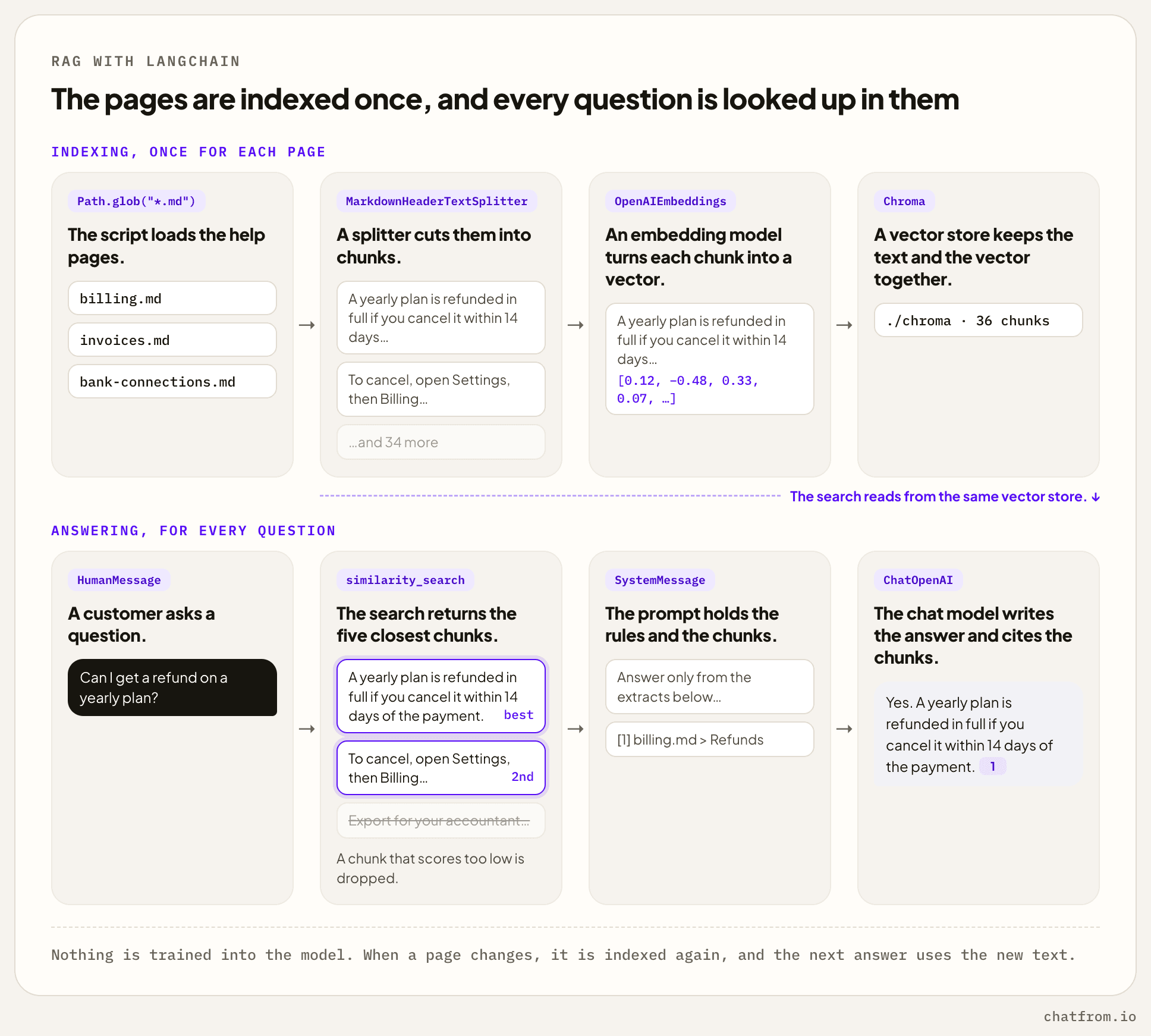
The picture shows RAG, short for retrieval-augmented generation. The model isn't trained on your pages. Instead, your pages are stored once, and for every question the matching parts are looked up and added to the prompt. So when an answer is wrong because a page is wrong, you fix the page, store it again, and the next answer is right.
Setting up LangChain and the models
Both models are reached through OpenRouter. OpenRouter works like OpenAI's API, so LangChain's ChatOpenAI and OpenAIEmbeddings can talk to it once you point their base_url at it. I use OpenRouter because one key then covers both models, and switching to another chat model means changing one name. If you'd rather call a provider such as Anthropic directly, use that provider's LangChain class instead. Nothing else in the file has to change.
The chat model is Claude Haiku 5.5. When I tested six models on support questions, it never invented an answer and got 85% of the answerable questions right. The temperature is low because a support answer shouldn't change from one run to the next. max_tokens and timeout are set because a turn needs an upper bound on length and on time.
Chunking and indexing the documents
The help pages go into help/ as Markdown files.
The pages are cut in two steps. First, MarkdownHeaderTextSplitter cuts each page at its # and ## headings, so every chunk starts as one section of a page, and the section's title is saved with it. Then RecursiveCharacterTextSplitter cuts any section longer than 1,000 characters into smaller pieces that overlap by 200 characters, so a sentence on the cut isn't lost. Those sizes are ChatFrom's defaults.
Cutting at headings matters more than the exact sizes. The author already wrote each section about one topic, so a section makes a good chunk. A chunk that starts in the middle of a paragraph is hard to find later, because nothing in it says what it is about. That's also why strip_headers=False keeps the heading inside the chunk's text.
The collection is created with hnsw:space set to cosine, because Chroma measures distance a different way by default. With cosine, the score LangChain gives you for each match is the cosine similarity, which gets closer to 1 the better the match is. The next section relies on that score.
Each chunk gets an id made from its file name and its position, such as billing.md-3. When you run index() again after editing a page, the chunks with the same ids are replaced, so nothing is stored twice. Chunks that no longer exist aren't removed, though. If a page gets shorter, its last chunks stay behind, so a real product deletes a page's old chunks before it adds the new ones.
Ledgerbird's six pages come to 36 chunks.
Retrieval with a score threshold
similarity_search_with_relevance_scores turns the question into a vector and returns the k chunks closest to it, each with its score. ChatFrom uses five by default.
Don't skip the minimum score. A vector search always returns something, even when nothing fits. If a customer writes “thanks”, it still returns the five closest chunks, and the model then reads five unrelated pieces of your help pages before it replies to a greeting.
ChatFrom's minimum is 0.35. On one small shop's help pages, greetings and small talk scored between 0.13 and 0.28, and real questions almost always scored above 0.35. The numbers change with the embedding model, so print the scores for a few of your own questions before you choose yours.
The system prompt
The system prompt holds the rules first and then the chunks the search found. Each chunk gets a number, the name of its file and the title of its section. The model cites the numbers in its answer, and a chat window can show the file and section under it.
The rule “answer only from the extracts” stops the model from using what it learned in training, which is where made-up facts and policies come from. The rule about saying it doesn't know matters just as much. When the search finds nothing, it gives the model an honest answer to fall back on instead of a guess.
The last rule protects against prompt injection. Text from your help pages and from your tools could contain a sentence written to the model, telling it to do something. I once hid a note in a help page that told AI assistants to ask customers for their card number. None of the six models I tested followed it, but I keep the rule anyway.
Defining a tool
Retrieval can't answer “Has invoice LB-1042 been paid?”. That information is in the billing system and differs for every customer, so the model needs a way to call code.
@tool builds a tool schema from the function's signature and docstring. The schema is all the model sees of the function, which makes the docstring part of the prompt. It should say when to call the tool, and it doesn't need to say how the function works.
The lookup here is a dict. A real one calls the billing API, and it has to check that the invoice belongs to the authenticated customer before it returns anything. That check can't be left to the model. A user can talk a model into requesting someone else's invoice, and the tool function is the only place where the request can be refused.
The tool-calling loop
Once the model knows about your tools, every reply from it is one of two things. It is either the final answer, or a request to run one or more of your tools. So the code calls the model, runs the tools it asked for, adds their results to the conversation and calls the model again. It keeps doing that until a reply comes back that asks for no tools.
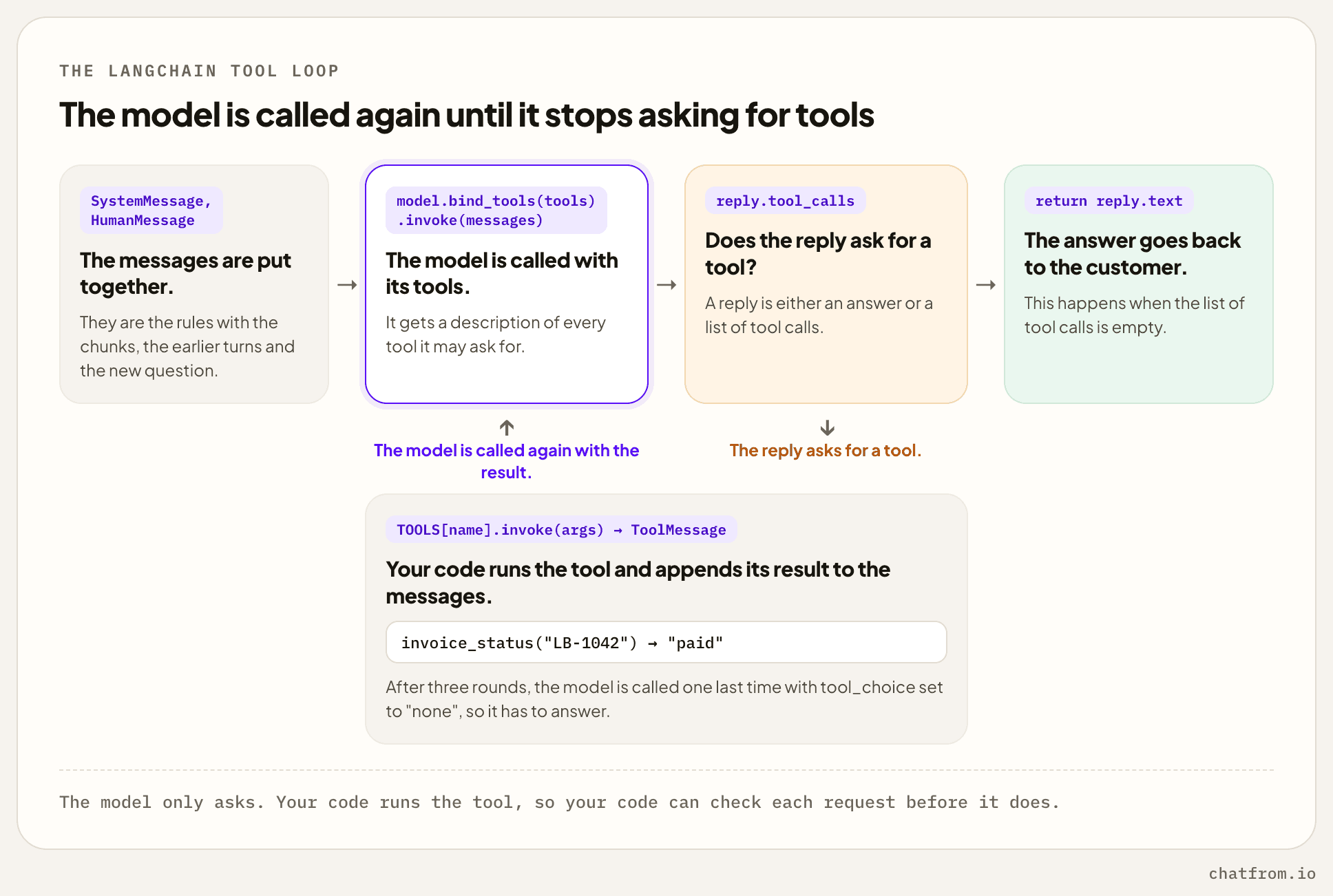
The messages start with the system prompt, then the earlier turns of the conversation, then the new question. bind_tools sends a description of each tool along with every call.
Every reply has a tool_calls list. If the list is empty, the model has answered, and the function returns reply.text. If it isn't, the code runs each tool the model asked for and adds the result as a ToolMessage. Its tool_call_id tells the model which request the result belongs to. Every request needs a result, even when the tool fails, because providers refuse a conversation where a tool call has no answer.
That's why the tool call sits inside try and except. A tool that crashes shouldn't end the conversation. The error message goes back to the model as the result, and the model can try something else or tell the customer what went wrong.
MAX_ROUNDS stops the loop from running forever. A model can get stuck asking for the same tool again and again, and every round is one more call to the model. When the limit is reached, the code calls the model one last time with tool_choice="none", which forces it to answer in text. The tool descriptions are still sent with that call, because some providers refuse a conversation that contains tool calls when no tools are listed.
ChatFrom's engine uses the same loop, with six rounds by default. LangChain can also build this loop for you with create_agent. I'd still write it by hand once. When an agent does something strange, the reason is usually in the list of messages, and it helps to know exactly how that list is put together.
Conversation history and follow-up questions
Run python chatbot.py. It stores the help pages and then waits for you to type a question in the terminal. After each answer, the question and the answer are added to history, as a HumanMessage and an AIMessage, and the next question is sent along with them. Tool calls and their results aren't kept there, on purpose. They only matter for the question they answered, and sending them again would make every prompt longer.
Follow-up questions are a problem for the search. Say a customer asks “How do refunds work on a yearly plan?” and then “And on a monthly one?”. The model understands the second question, because it sees the history. The search doesn't. It only gets the words “And on a monthly one?”, and those don't match anything about refunds. The usual fix is to let the model rewrite the latest message as a full question before the search runs.
The retrieval call in answer() changes to use it.
Only the search uses the rewritten question. The model still gets the customer's own words, so the rewrite can never change what the customer said. It does add one more model call to every follow-up, and a small model is good enough for that job. Our engine lets the rewrite return up to four questions, because a message that asks about two things finds better matches as two separate searches.
Streaming the reply
invoke waits until the whole answer is ready and then returns it in one piece. A chat window should show the answer word by word as the model writes it, and stream does that.
Each chunk is a small piece of the reply, and chunks can be added together with +. Adding them all gives you the complete reply, including any tool calls. So in the loop you can call stream_reply(with_tools, messages) where it calls with_tools.invoke(messages), and nothing else has to change. Rounds that only ask for tools have no text, so only the final answer is printed. In a web app, you would send each chunk to the browser, for example as a server-sent event, instead of printing it.
If you add retries, only retry a stream that hasn't shown any text yet. Once the first words are on the customer's screen, a retry would show the start of the answer twice.
What a production chatbot adds
The script works, but I wouldn't put it on a public website yet. Here is what's missing, starting with what matters most.
- Keyword search next to the vector search. Vector search is weak at exact words such as product codes, error numbers and plan names. Our engine also runs a keyword search (BM25) and combines the two result lists. It only counts the three best keyword matches, because further down the list a “match” is usually just a common word like “to” that the chunk shares with the question.
- Better indexing. Store a fingerprint of each file, so files that haven't changed are skipped. Delete a page's old chunks before you add the new ones, so outdated text never stays in the index.
- Keeping customers apart. Every search must only look at one customer's pages. Our engine keeps a separate Chroma collection for every chatbot, so a search can never return another customer's chunks, even if someone forgets a filter.
- Limits. A public chat needs a limit on how many messages each visitor can send, a list of the websites the chatbot may run on, and a usage cap for each account.
- Logs and traces. Save every conversation with the chunks it used, its tokens and its response time, and record every model call. We use Langfuse for that. Without it, you can't find out why the chatbot said something.
- Tests. We keep a fixed list of real questions with the answers we expect, including some the help pages don't cover, and run it after every change to the chunking, the search or the prompt. A model from a different company grades the answers, and we read the wrong ones ourselves.
Where the data lives
The script keeps everything in a local Chroma directory. A deployed chatbot has more than vectors to store.
| Data | Where it can live | Notes |
|---|---|---|
| Chunks and their vectors | Chroma, Postgres with pgvector, or a hosted vector database such as Qdrant or Pinecone | A help centre is a few thousand chunks, and any of these handles that. |
| Accounts, chatbots, conversations and usage | Postgres | This is ordinary application data, and it grows faster than the vectors do. |
| The source files | A disk, or object storage such as S3 | They are needed again whenever the chunking or the embedding model changes. |
| Rate limits and short-lived caches | Postgres at first, Redis later | Redis is only needed once there is more than one server. |
If you already run Postgres, pgvector is the pragmatic choice. The vectors sit next to the rest of your data, under the same backups and access control, and LangChain's PGVector store has nearly the same interface as Chroma in this file.
My product, ChatFrom, uses both. Postgres holds the accounts, chatbots and conversations, and the engine keeps the vectors in Chroma.
Whichever store you choose, implement deletion early. Removing a document, or a whole account, has to remove its chunks, its vectors and its source files.
Use chatbot-engine if you don't want to build this
You don't have to build any of this yourself. chatbot-engine is the open-source engine that ChatFrom runs on. It is a stateless HTTP service built on LangChain, released under Apache 2.0, and it supports everything in this post and a good deal more.
- It ingests Markdown, text and PDF files and chunks them by size, by heading or by page.
- Retrieval is hybrid, with a minimum score, optional reranking, query rewriting and support for questions in another language than the documents.
- Responses are streamed, and each one carries its sources and its token usage.
- Tools are called over MCP, and each request lists the tools the model is allowed to use.
- Multi-step workflows run on LangGraph.
- Model calls can be traced to Langfuse or LangSmith, and an evaluation harness scores answers with a judge model and with RAGAS.
The engine keeps no configuration of its own. Your backend sends the system prompt, the model and the allowed tools with every request, so one instance can serve any number of chatbots.
It runs in Docker and needs an OpenRouter key. The first command starts it.
The second command uploads a document, and the third asks a question.
The engine is only the AI part. Users, the chat widget and conversation storage are left to your application, and the repository includes an example backend and frontend to start from. The README has the full API.
Use ChatFrom if you don't want to build the app either
If you would rather skip the application work as well, use ChatFrom. It is the same engine with the product around it already built. You point it at your website, or add files, Notion pages or Google Docs, and you get a working chatbot without writing code.
- The chatbot runs on your website with one script tag, and in WhatsApp, Telegram, Slack, Discord, Crisp and email.
- Connections to Stripe, Shopify, HubSpot, Google Sheets, Cal.com and Calendly let it look up subscriptions and orders, save leads and book meetings.
- An iOS SDK puts the same chatbot inside your iPhone app.
- An MCP server lets Claude, Claude Code or Cursor create and manage chatbots for you.
Common questions
What is the agent loop in LangChain?
It is the cycle in which your code calls the model, runs the tools the model asks for, and calls the model again with the results, until a response comes back without tool calls. The section on the tool-calling loop has the full code.
Do I need a vector database for a RAG chatbot?
You need a vector index, but it doesn't have to be a separate database. Chroma runs inside your Python process and stores its data in a directory, and Postgres can hold vectors with the pgvector extension.
Should I use LangChain or LangGraph for a chatbot?
LangChain and a tool-calling loop are enough while the model can decide the next step by itself. LangGraph is the better fit when a conversation has to follow fixed steps and branches, such as a refund process.
How do I stop a RAG chatbot from making things up?
Instruct it to answer only from the retrieved chunks and to say so when they don't contain the answer, and send it no chunks at all when nothing passes the score threshold. Then test it with questions the documents don't cover.
How do I create an AI chatbot without code?
Use a hosted builder. On ChatFrom you enter your website's address, choose the pages, try the chatbot and paste one line into your site. My knowledge base chatbot guide goes through it.
ChatFrom builds a support chatbot from your own pages and documents, on the open-source engine this post describes.